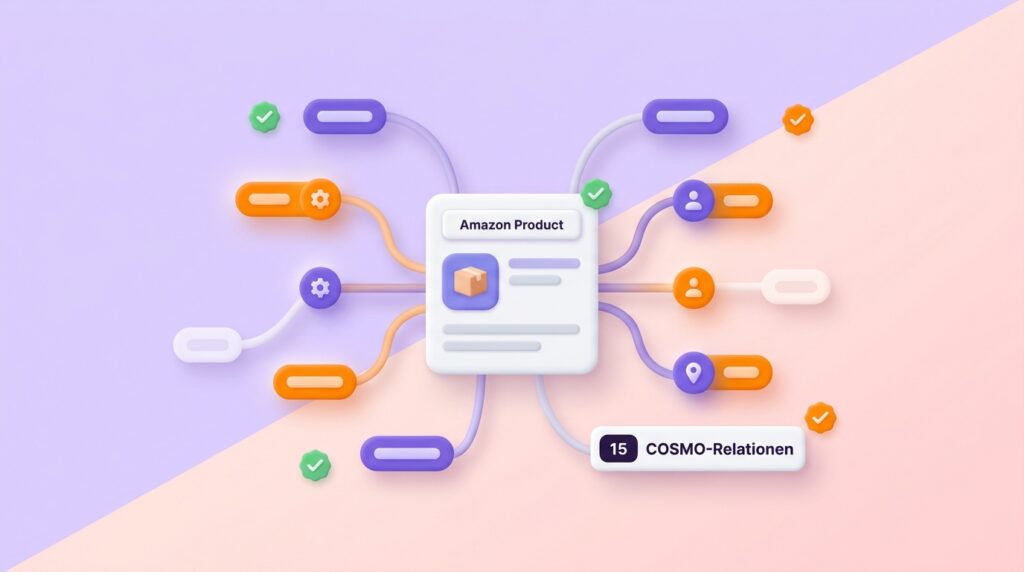
You already know that COSMO is Amazon’s knowledge graph and how the system works at its core. But how do you put this knowledge into practice? That’s exactly what this article is about.
What are COSMO Relations and Why Do They Determine Visibility?

The more of the 15 COSMO relations your listing covers, the more search queries you will reach. A listing with 12 out of 15 relations will be shown much more frequently than one with only 5.
In the second part of our series, we explained COSMO as a system: its architecture, the 6.3 million nodes, the four data sources. Now it gets practical. We’ll break down each of the 15 COSMO relations and show you, with before-and-after examples, how you can apply them in your listing. At the end, you’ll get a checklist you can use to get started right away.
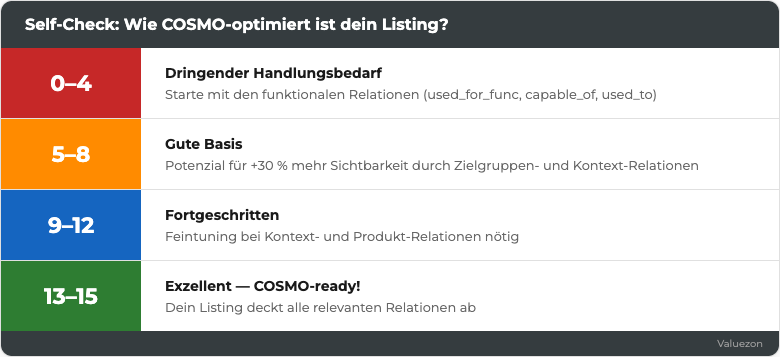
Fig. 1: The 15 COSMO relations as an optimization framework: each relation evaluates a different aspect of your product knowledge. Source: Valuezon / Own illustration 2026
Note: The 15 relations are based on the Amazon Science paper “COSMO: A large-scale e-commerce common sense knowledge generation and serving system” (SIGMOD 2024). In this article, we focus on the practical implementation for your listing.
At a glance:
- COSMO evaluates products based on 15 defined relation types, not on keywords.
- Each relation describes a different aspect of your product knowledge (function, target audience, context, category).
- Missing relations mean gaps in the knowledge graph, so fewer impressions for relevant search queries.
- You can influence each relation via your listing, your images, and your A+ content.
Think of COSMO’s knowledge graph as a form with 15 fields. Each field represents information that Amazon wants to know about your product. What is it for? Who uses it? Where is it used? What goes with it?
The more fields you fill out, and the more precisely, the better Amazon’s AI understands your product. A listing that covers 12 of the 15 relations will be shown for significantly more search queries than one that only contains 5. This is your strongest starting point.
As we showed in the second part of our series, COSMO learns these relations from four sources: your listing text, product images, customer reviews, and purchase behavior. At least two of these sources are under your direct control. You influence the others indirectly.

Subscribe to our newsletter and receive fresh updates every two weeks.
Functional Relations: The Basis of Your Listing
At a glance:
- The three functional relations form the core of your listing work.
- They answer the fundamental question: What does your product do and what problem does it solve?
- Missing functional relations are the most common reason for weak COSMO scores.
- Start with these three. They matter the most.
The Main Function: used_for_func
This relation describes the primary purpose of your product. COSMO wants to know: What is this product mainly used for?
How to implement used_for_func: The main function belongs in the title and in the first bullet point. Formulate it as a clear, specific statement, not as a marketing cliché.
In the first example, the function is completely missing. “First-class quality” is not a function. In the second example, COSMO immediately understands: used_for_func → Listening to music while exercising.
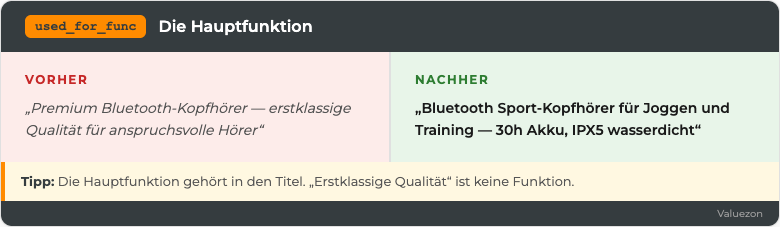
Fig. 2: Before/After: The main function is explicitly stated in the listing instead of being replaced by marketing buzzwords. Source: Valuezon 2026
💡 Tip: Formulate the main function so that a customer would use it naturally in a question to Rufus. “Which headphones are good for jogging?” That is exactly what your listing should answer.
Features and Capabilities: capable_of
While used_for_func describes the main purpose, capable_of captures the individual features and technical capabilities. COSMO uses this relation to display your product in response to specific feature requests.
How to improve capable_of: Every feature needs a measurable value. Replace vague adjectives with numbers or specifications.
COSMO can’t do anything with “impressive.” But with “30 hours,” it can. If a customer asks “Which headphones have the longest battery life?”, Rufus can compare and quote your product.
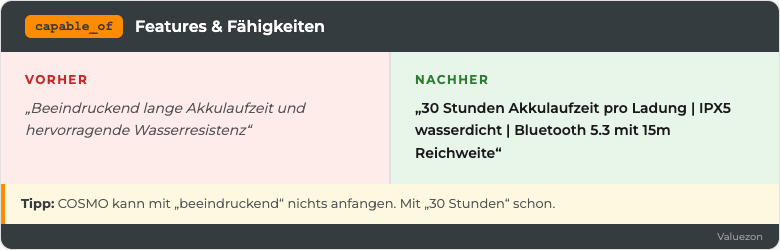
Fig. 3: Before/After: Vague adjectives are replaced by measurable numbers and specifications. Source: Valuezon 2026
💡 Tip: List 5 to 7 features and check for each: Can I provide a number, certification, or measurable property? If so: get rid of the adjective.
The User Action: used_to
This relation describes the actions a user performs with your product. The difference with used_for_func: The function is abstract (listening to music). The action is situational (listening to music while jogging, working with focus in the office).
How to strengthen used_to: Describe 3 to 5 usage scenarios in your bullet points.
Each of these formulations creates its own used_to relation in the knowledge graph. “Versatile” does not create a single one.
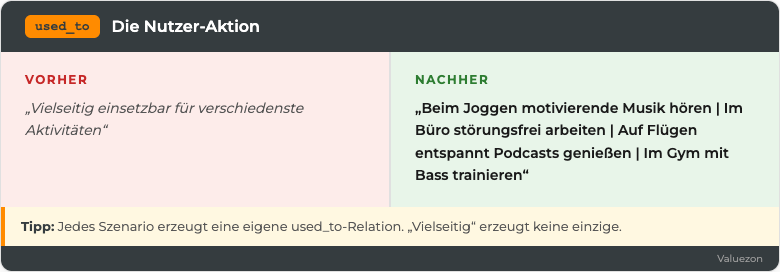
Fig. 4: Before/After: Concrete usage scenarios generate several separate relations; “versatile” does not create any. Source: Valuezon 2026
Audience Relations: Who buys your product?
At a glance:
- Audience relations determine which customer groups will see your product.
- COSMO distinguishes between the defined target audience and the actual users.
- Reviews are the most important data source for
used_by. You only influence them indirectly. xInterested_inexpands your reach into related product categories.
Your Target Audience: used_for_aud
This relation defines which group of people your product is intended for.
How to strengthen used_for_aud: Explicitly name your target group. In the title, in the bullets, and especially in the A+ content.
“For everyone” is not a target audience. “Runners, fitness enthusiasts, and commuters” creates three separate used_for_aud relations.
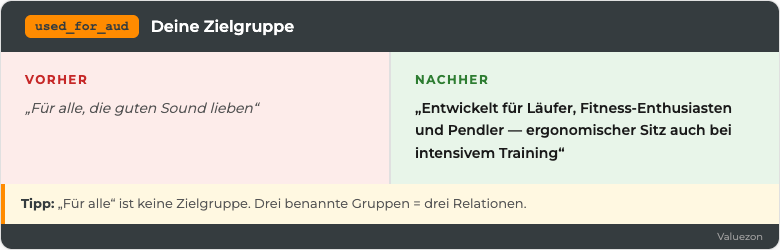
Fig. 5: Before/After: Specific target audience designation instead of the generic ‘for everyone’ phrasing. Source: Valuezon 2026
Who really uses it?: used_by
The difference to used_for_aud: This relation is mainly derived from reviews and purchase data. It shows who actually buys your product. And this may well differ from your defined target audience.
How to influence used_by: You can’t directly control used_by. But you can influence it indirectly. Systematically read through your reviews. Which user groups describe themselves? If you notice that nurses use your headphones for night shifts, mention ‘Ideal for long shifts’ in your listing.
💡 Tip: Create a list of all user groups that appear in your last 50 reviews. Every group you address in your listing strengthens the used_by relation.
Related interests: xInterested_in
This meta-relation connects your target audience to their broader interests. COSMO uses it to display your product in related searches.
How to incorporate xInterested_in: Mention your target audience’s interests and lifestyles in your A+ content and bullets.
Example: ‘Whether marathon training, CrossFit, or your daily 5K run, these headphones keep up with your active lifestyle.’
Context Relations: Where, When, and How?
At a glance:
- Context relations determine in which situations your product is shown.
- Especially valuable for seasonal and occasion-based search queries.
- COSMO models usage locations, events, and physical references separately.
- Many sellers neglect these relations. That’s exactly why it pays to focus here.
Usage locations: used_in_loc
Where is your product used? This relation is crucial for location-based searches.
How to expand used_in_loc: Name 3 to 5 usage locations in your bullets and images.
Each location you mention creates its own used_in_loc relation. ‘Everywhere’ creates none.
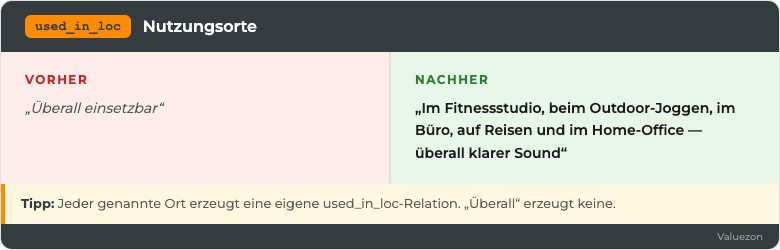
Fig. 6: Before/After: Every explicitly named usage location creates its own relation, ‘everywhere’ creates none. Source: Valuezon 2026
Occasions and events: used_for_eve
This relation connects your product with specific occasions: birthdays, Christmas, back-to-school, weddings, Black Friday.
Example: ‘The perfect gift for sports enthusiasts, with premium packaging and a personal greeting card, ideal for birthdays, Christmas, or as a reward for fitness achievements.’
Physical reference: used_on / used_in_body
These two relations describe on which part of the body or surface your product is used.
For headphones: ‘In-ear design fits securely in the ear · Soft silicone tips in three sizes for comfortable wearing’
For skincare: ‘Suitable for face and neck · Especially gentle on sensitive skin around the eye area’
💡 Tip: If your product has no physical context (e.g., software, office supplies), simply leave out this relation. Not every relation fits every product.
Product Relations: Placement in the Ecosystem
At a glance:
- Product relations determine how your product is placed within the Amazon ecosystem.
used_withopens up cross-selling potential and taps into related search queries.used_asdefines the role of your product (main product, gift, replacement part, or accessory).is_apositions your product in the taxonomy and influences categorization.
Complementary Products: used_with
This relation describes which other products your product is typically used with.
Example: “Compatible with all common smartphones (iPhone 12 to 15, Samsung Galaxy S22 to S24) · Perfect together with our Bluetooth charging station (sold separately)”
Alternative Uses: used_as
How is your product actually used in practice? This relation goes beyond the main function.
Each use creates its own used_as relation, expanding your listing’s reach.
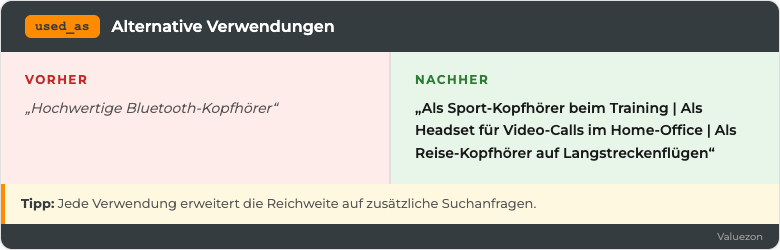
Fig. 7: Before/After: Multiple usage contexts create several separate relations. Source: Valuezon 2026
Product Category: is_a
This relation defines what your product is. It’s the taxonomic classification.
How to sharpen is_a: Make sure your title clearly communicates what your product is. The product type should appear in the first 60 characters.
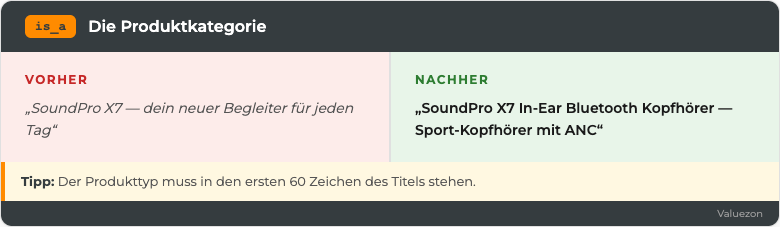
Fig. 8: Before/After: Clear product type in the first 60 title characters. Source: Valuezon 2026
Advanced Relations: xIs_a and xWant
At a glance:
xIs_adescribes characteristics of your target group (not your product).xWantcaptures overarching goals and desires of the buyers.- Both relations are harder to control. Still, they are valuable for long-tail visibility.
Specific Variants and Target Group Characteristics: xIs_a
xIs_a describes how the target group thinks: price-conscious, quality-oriented, tech-savvy, minimalist.
Example: “For audiophile music lovers who won’t compromise on sound quality, with Hi-Res Audio certification and 40mm beryllium drivers”
Cross-selling signals and buyer desires: xWant
xWant describes what your target audience is looking for in addition to your product. This relation is mainly derived from co-purchase data.
Example: “Included: Protective case, 3 pairs of silicone tips, and USB-C charging cable so you can get started right away. Suitable replacement tips and a Bluetooth charging station can be found in our shop.”
Practical example: Optimizing a complete listing with COSMO
We take a real product (stand blender) and work through each relation step by step. Previously, 2 out of 13 relations were covered; afterwards, 13 out of 13. You can apply this process to your own listing.
Initial situation: A German premium manufacturer sells a high-performance stand blender on Amazon. The title is: “High-performance stand blender smoothie maker blender 1200W stainless steel”. The bullets only list technical specifications.
Analysis of Covered Relations
Result: 2 out of 13 relevant relations covered.
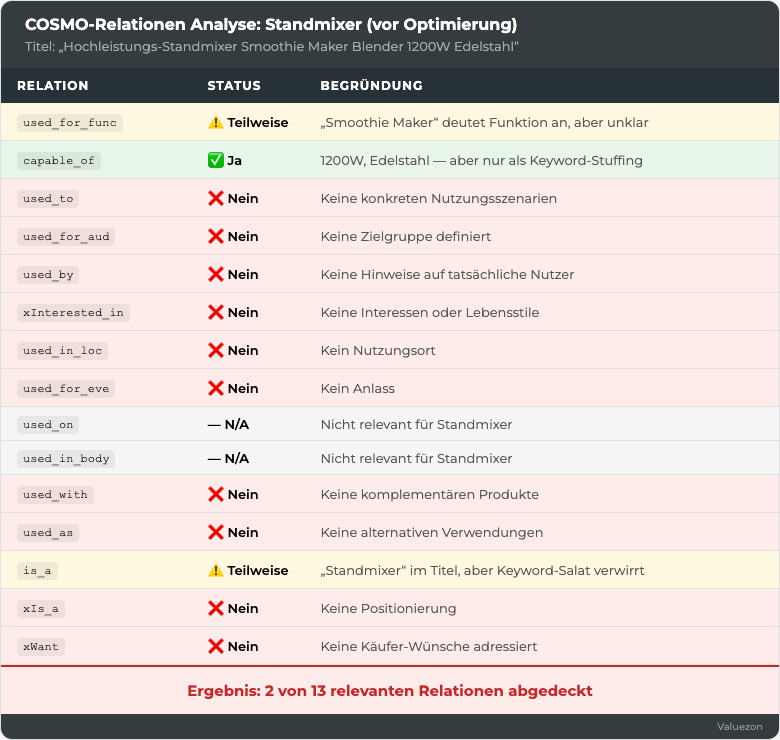
Fig. 9: Stand Blender Analysis: Previously, 2 out of 13 relations were covered. Source: Valuezon 2026
After Optimization
Title: “Premium stand blender for smoothies, nut butter, and soups, 1200W, 2L stainless steel container”
→ used_for_func ✓, capable_of ✓, is_a ✓, used_to ✓
Bullet 1: “Green smoothies in 30 seconds, easily crushes frozen fruits, vegetables, and protein powder”
→ used_to ✓
Bullet 2: “Ideal for health-conscious families, fitness enthusiasts, and hobby chefs”
→ used_for_aud ✓, xIs_a ✓ (health-conscious)
Bullet 3: “In the kitchen, at the office, or at the gym—fresh smoothies everywhere”
→ used_in_loc ✓
Bullet 4: “The perfect gift for birthdays, housewarmings, or Christmas, in premium packaging”
→ used_for_eve ✓, used_as ✓ (gift)
Bullet 5: “Compatible with our additional containers and cutting attachments, fits perfectly with kitchen appliance sets”
→ used_with ✓
A+ Content: Brand story + recipes + lifestyle images
→ xInterested_in ✓, xWant ✓
Result after optimization: 13 out of 13 relevant relations covered.
Self-check: How COSMO-optimized is your listing?
At a glance:
- Go through all 15 relations systematically and check if your listing covers them.
- Start with the functional relations. They deliver the greatest impact.
- A score of 10+ covered relations (excluding N/A) is the goal.
- Document your results and improve step by step.
Checklist: 15 COSMO Relations for Your Listing
used_for_func: Is the main function clearly described in the title?capable_of: Are all features supported with numbers?used_to: Are at least 3 usage scenarios described?used_for_aud: Is the target group explicitly named?used_by: Do your bullets reflect the user groups from the reviews?xInterested_in: Are the lifestyles and interests of the target group mentioned?used_in_loc: Are 3 to 5 usage locations mentioned?used_for_eve: Are suitable occasions and events mentioned?used_on/used_in_body: Is the physical reference described (if necessary)?used_with: Are compatible products and accessories mentioned?used_as: Are alternative uses described?is_a: Is the product type clearly stated in the first 60 title characters?xIs_a: Is the positioning (Premium, Budget, All-rounder) clear?xWant: Are the overarching needs of buyers addressed?
Scoring Recommendation
| Covered | Assessment |
|---|---|
| 0 to 4 | Urgent need for action, start with the functional relations |
| 5 to 8 | Good foundation, but potential for +30% more visibility |
| 9 to 12 | Advanced. Fine-tuning context and product relations is worthwhile |
| 13 to 15 | Excellent: your listing is COSMO-ready |
If you reach 10+ relations, you are already one step ahead of most competitors. In the next article in our series, we’ll show you the 10 Rufus factors—the other half of AI visibility. COSMO defines what Amazon knows about your product. Rufus determines how this information is presented to the customer.
Frequently Asked Questions about COSMO Relations
What are the 15 COSMO relations and why are they important for Amazon sellers?
The 15 COSMO relations are standardized connections in the Amazon knowledge graph that describe different aspects of a product. From the main function (used_for_func), to the target group (used_for_aud), to places of use (used_in_loc), and complementary products (used_with). The more relations your listing covers, the better Amazon’s AI understands your product. The result: it will be shown more frequently for relevant search queries.
Which COSMO relations should I optimize first?
Start with the three functional relations: used_for_func, capable_of, and used_to. They have the greatest impact on visibility and answer the basic question of what your product does and what problem it solves. After that, expand to target group and context relations. In practice, just working on the functional relations can improve the COSMO ranking by 15 to 25%.
How are COSMO relations and Rufus factors connected?
COSMO relations define what Amazon knows about your product. They feed the knowledge graph. The 10 Rufus factors determine how well your listing can be cited by the AI shopping assistant. Both systems work together: COSMO provides the knowledge, Rufus handles the presentation.
Do I need to cover all 15 relations for my listing?
No. Not every relation fits every product. used_on and used_in_body, for example, are only necessary for body-related products. The goal: cover all relations that make sense for your product. For most products, 10 to 12 relations are realistic and sufficient.
How can I check if COSMO correctly understands my listing?
The simplest test: Open Rufus in the Amazon app and ask typical customer questions about your product category. Is your product recommended? Does Rufus provide the correct information? Alternatively, you can request the Boost^AI Score from Valuezon, which systematically evaluates all 15 COSMO relations.
Sources
- Amazon Science: *COSMO, A Large-Scale E-Commerce Common Sense Knowledge Generation System* (SIGMOD 2024)
- ACM Digital Library: COSMO Paper, SIGMOD Industrial Track 2024
- AWS Machine Learning Blog: *How Rufus Scales Conversational Shopping Experiences*
- About Amazon: *Rufus, Amazon’s AI-Powered Shopping Assistant*
- Amalytix: *Amazon AI Tools, The Complete Guide for Sellers* (2026)
- Amalytix: *Amazon Rufus Study, 1,300+ Products Reveal AI Patterns*
Next article in this series: The 10 Rufus factors, i.e. the other half of AI visibility. Coming mid-June 2026.